




Growing a WooCommerce store starts with getting your products in front of the right customers, but that part usually takes a lot of time and effort.
That’s where product feed plugins help. They automatically sync your store catalog with platforms like Google Shopping, Facebook Marketplace, and price comparison sites, so you can reach people who are already searching online for what you sell. 🛍️
After testing several options, I found Product Feed PRO by AdTribes to be a standout choice. But I also explored other top plugins to see how they compare in features, ease of use, and overall value.
In this guide, I’ll share the best WooCommerce product feed plugins to help you boost visibility, attract more customers, and grow your sales, without adding extra work to your day.

My Verdict: Best WooCommerce Product Feed Plugins
Here’s a quick overview of the best WooCommerce product feed plugins if you’re in a rush:
| # | Plugin | Best For | Pricing |
|---|---|---|---|
| 🥇 | Product Feed PRO by AdTribes | Advanced multi-channel product feeds (100+ integrations) | $99.50/yr + Free |
| 🥈 | CTX Feed | Easy multi-channel feeds creation with templates and guided setup | $119/yr + Free |
| 🥉 | ELEX WooCommerce Google Shopping | Advanced customization for Google Shopping | $69/yr + Free |
| 4 | WebToffee Product Feed for WooCommerce | Instagram and Facebook product feeds | $89/yr + Free |
| 5 | Product Feed Manager by Conversios | International platforms like TikTok and Google Shopping | $49/yr + Free |
| 6 | Product Feed Manager by RexTheme | Easy feed creation for beginners | $59/yr + Free |
| 7 | Product XML Feed Manager for WooCommerce | Custom XML feeds | $4.17/month + Free |
What Is a WooCommerce Product Feed, and Why Should You Use One?
A WooCommerce product feed is basically a file that lists all the products in your online store in a way that other platforms can read—like Google Shopping, Facebook, Instagram, or Amazon.
Using a product feed can save you a lot of time and help more people see your products.
Here’s why it’s useful:
- Automatic Updates: When you change prices, stock, or product descriptions in WooCommerce, the feed updates all platforms automatically.
- Reach More Customers: Your products can show up in shopping ads and search results where people are already looking to buy.
- Save Time: You only need to update your store. The feed handles all platforms for you.
- Fewer Mistakes: Automatic syncing helps prevent errors such as incorrect prices or missing product information.
- Easy to Grow: Want to sell on more marketplaces? Feeds make it simple to share your products everywhere.
In short, a product feed keeps your products in sync and helps more people find them—making it a smart tool for any WooCommerce store.
🧪 My Hands-On Methodology for Testing WooCommerce Product Feed Plugins
Here at WPBeginner, we believe in hands-on testing and don’t rely on feature lists or marketing claims.
That’s why I installed each product feed plugin in a WooCommerce store with demo products that included variations, sale prices, custom attributes, and category mappings.
Here’s what I focused on during testing:
- Ease of Use: I tested how easy it is for a beginner to create a feed without needing to read lengthy documentation. If it took more than a few clicks to generate a basic Google Shopping feed, that was a red flag.
- Supported Channels: I tested which platforms the plugin supports natively, like Google, Facebook, Pinterest, TikTok, Bing, and custom XML feeds.
- Mapping and Customization: I looked at how easily the plugin lets you “map” your product details (like price and name) to the fields required by each shopping channel (like Google Shopping’s ‘price’ and ‘title’ fields). The more flexible the mapping options, the better.
- Feed Quality: I uploaded the generated feeds into Google Merchant Center and Facebook Catalog Manager to check for validation errors, missing attributes, or warnings.
- Speed and Performance: I evaluated whether the plugin slows down websites or causes memory issues, especially in larger stores with thousands of products.
- Auto-Update and Scheduling: I tested whether the plugins supported automatic syncing and scheduled updates, which are essential for dynamic inventory management.
- Support and Updates: Lastly, I checked each plugin’s documentation, user reviews, update frequency, and available support to see how reliable it is in the long term.
After all these tests, only a handful of plugins made the cut.
So if you’re wondering which ones are actually worth using, keep reading. I’ve listed the best WooCommerce product feed plugins that can help you grow your store by getting your products in front of more shoppers.
1. Product Feed PRO by AdTribes – Multi-Channel Feeds for 100+ Platforms

Product Feed PRO by AdTribes is a great choice for multi-channel product feeds without needing to learn anything technical.
It supports 100+ marketing and advertising channels, including Google Shopping, Facebook, Bing, TikTok, and more. This makes it a flexible solution for store owners who want to reach customers on multiple platforms.
My Experience
I first tried out this plugin while writing our guide on adding WooCommerce product feeds to Google Shopping, and it offers straightforward product feed creation with plenty of customization options.
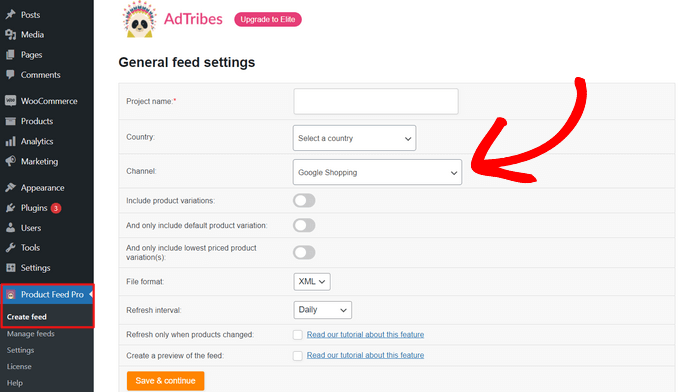
During testing, I found that AdTribes handles the complex product feed requirements for Google Shopping very well.
The plugin automatically maps your WooCommerce product data to Google’s required fields, saving you from the headache of manual configuration.
Plus, I found the feed generation process smooth and reliable, even when dealing with large product catalogs.
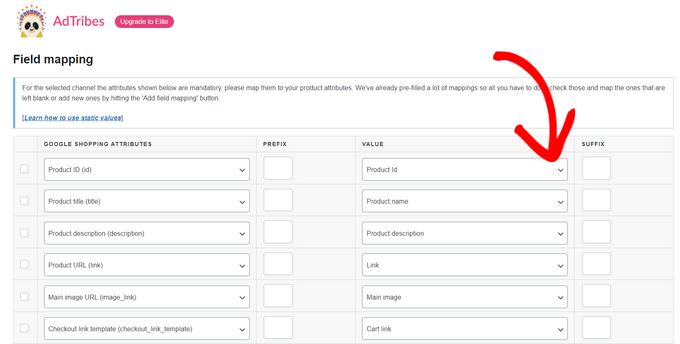
The plugin’s interface feels intuitive right from the start. You don’t need to be a technical expert to get your products flowing to Google Shopping.
AdTribes walks you through each step, from connecting your Google Merchant Center account to configuring product categories and attributes.
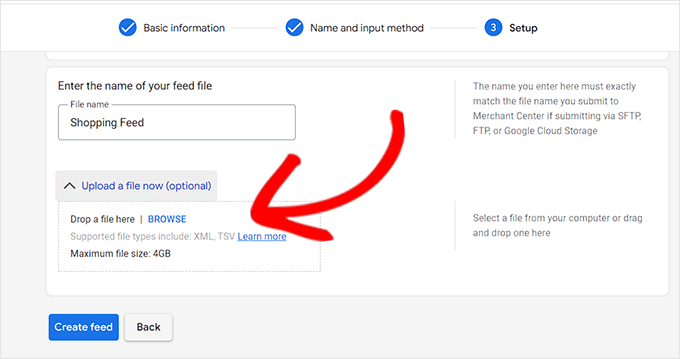
I particularly appreciated how the plugin handles product variations and complex inventory scenarios efficiently, without slowing down the feed generation process.
The plugin also includes helpful optimization features that can improve your product visibility.
It helps you select the best product images that meet platform requirements, ensures proper category mapping, and even lets you optimize product titles by creating rules. You can then add brand names and other important keywords to improve search performance.
In addition to Google Shopping, AdTribes supports feeds for many other channels like Facebook Remarketing, Pinterest, Bing Ads, TikTok Ads, Snapchat, PriceRunner, and other comparison engines. This makes it easy to promote your products everywhere your customers shop.
✅ Pros of Product Feed PRO by AdTribes
- Integrates with 100+ marketing and advertising channels
- WordPress multisite compatibility for managing multiple stores
- Built-in performance monitoring and feed health diagnostics
- Support for custom product fields and metadata
- WPML compatibility for multilingual stores
- Automatic feed updates
- Detailed documentation and video tutorials
❌ Cons of Product Feed PRO by AdTribes
- It can be overwhelming for users who only need a simple feed
- Large product catalogs can take longer to process on slower hosting environments
Why I recommend Product Feed PRO by AdTribes: It is the best choice for store owners who want a flexible, reliable, and easy-to-manage multi-channel product feed solution. While it works great for Google Shopping, its most significant advantage is the ability to push your WooCommerce products to over 100 channels with one plugin.
2. CTX Feed – Beginner-Friendly Multi-Channel Product Feeds
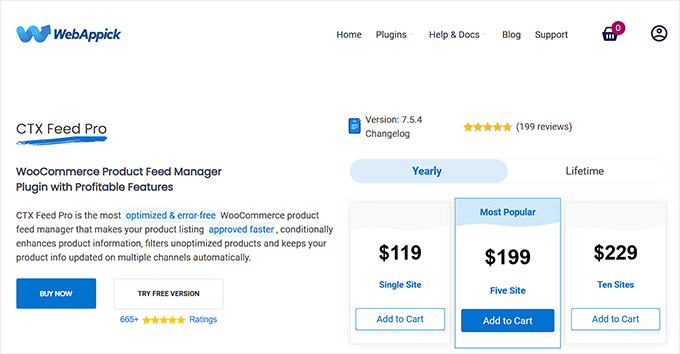
CTX Feed’s main strength is a beginner-friendly interface for multi-platform selling without any hassle. While it also supports over 100 channels, its focus is on pre-configured templates and a guided setup experience.
This makes it less overwhelming for new store owners.
The free version is powerful enough for most users to get started, while the premium plans unlock additional platforms and advanced features.
My Experience
I’ve tested CTX Feed extensively with various shopping platforms, and what stood out immediately was how fast and straightforward it is to get your products listed across multiple marketplaces.
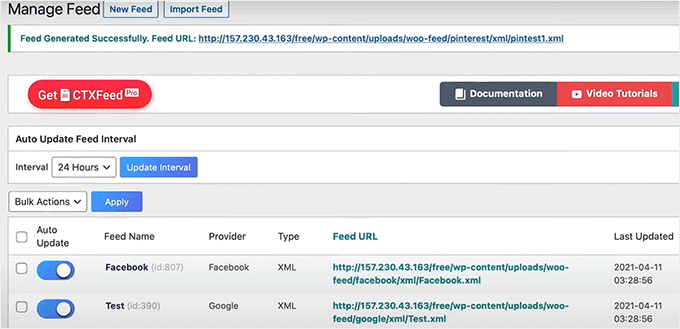
This plugin doesn’t just handle Google Shopping feeds. It also creates optimized product feeds for Facebook Catalog, Pinterest Shopping, Instagram Catalog, TikTok Catalog, Snapchat Catalog, eBay Ads, Bing Ads, and many other platforms.
The best part? You can easily manage all these feeds from a single dashboard, making it less intimidating.
Plus, I was surprised by how simple the feed generation process was. The plugin provides templates for major platforms, so beginners don’t need to worry about technical requirements.
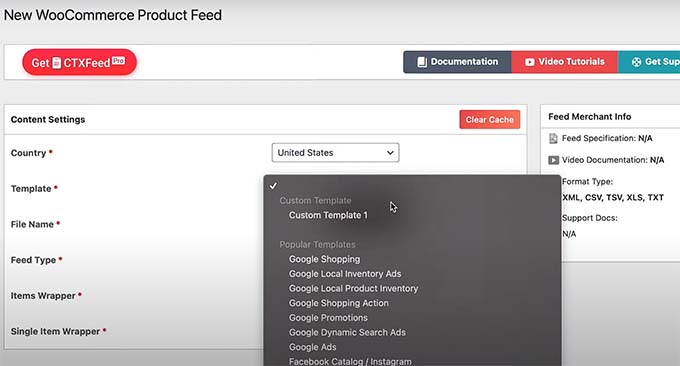
Another helpful feature for beginners is its intelligent auto-mapping.
The plugin automatically maps your WooCommerce product data to each platform’s requirements. That simplifies the setup process, allowing you to get your products listed quickly.
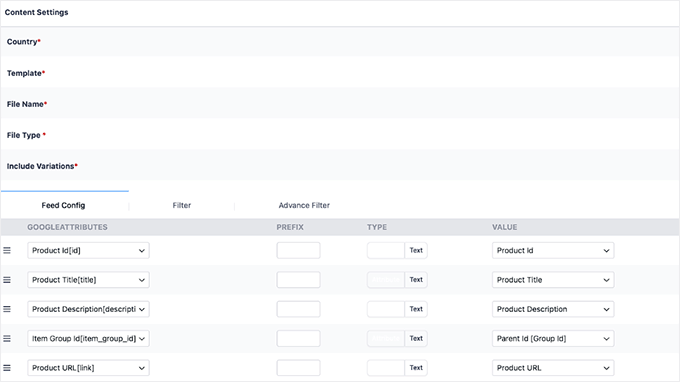
CTX Feed also handles large product catalogs effectively, making it a great WooCommerce plugin for stores of all sizes.
✅ Pros of CTX Feed
- Beginner-friendly setup with a guided wizard
- Supports 100+ shopping platforms and marketplaces
- Pre-configured templates for major shopping channels
- Auto-mapping feature
- Scheduled automatic updates across all platforms
- Detailed beginner-friendly documentation and tutorials
❌ Cons of CTX Feed
- Template-driven interface limits control over individual fields
- Some specialized platforms require the premium plan
- Occasional minor glitches when handling very large product catalogs
Why I recommend CTX Feed: This product feed plugin is perfect for beginners who want to quickly expand their reach without diving into technical settings. Its template-driven approach, guided setup, and auto-mapping make managing feeds across 100+ channels easy and fast.
3. ELEX WooCommerce Google Shopping – Precise Google Shopping Feed Control
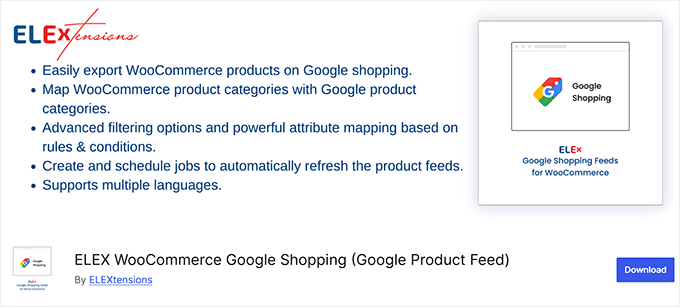
ELEX WooCommerce Google Shopping offers a high level of precision and advanced customization for Google Shopping feeds. It’s designed for users who want detailed control over their product feeds, allowing them to fine-tune attributes and optimize performance with granular settings.
Plus, many of the core features are available in the free plan, making it a great choice if you’re on a budget.
My Experience
When testing the plugin with Google Shopping campaigns, I found the field mapping to be very accurate. It gives you precise control over how your WooCommerce data is translated to meet Google’s requirements.
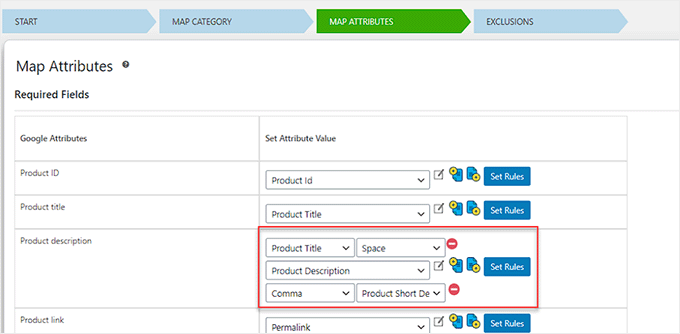
The plugin also excels at handling complex product types, like product bundles and variations.
This is something that many other plugins struggle with.
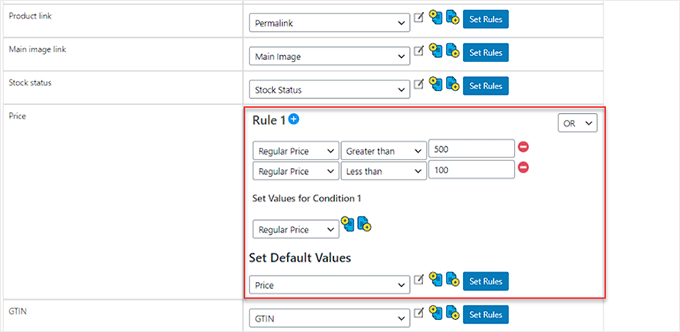
Other than that, its advanced filtering options let you create sophisticated rules for which products appear in your feeds, giving you strategic control.
For advanced users, the plugin offers comprehensive Google Shopping integration features. It handles Google Merchant Center synchronization, helps you fix errors that cause products to be disapproved, and provides detailed insights into feed performance.
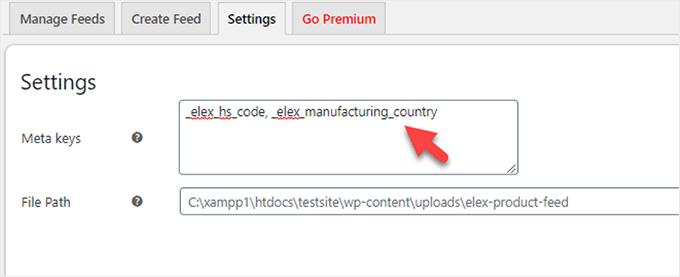
It also includes advanced optimization features specifically designed for Google Shopping.
For example, the tool handles product title optimization, ensures proper category mapping according to Google’s taxonomy, and manages promotional pricing and seasonal campaigns.
✅ Pros of ELEX WooCommerce Google Shopping
- Highly accurate and precise field mapping for Google Shopping
- Advanced filtering and product selection rules
- Bulk editing capabilities for large catalogs
- Detailed feed performance analytics and reporting
- Support for complex product types and variations
- Regular updates to match Google Shopping policy changes
❌ Cons of ELEX WooCommerce Google Shopping
- Limited to Google Shopping only, without native support for other platforms
- Advanced filtering and optimization features require a paid plan
- The setup for complex product types can be slightly technical
Why I recommend ELEX WooCommerce Google Shopping: This is a great plugin for users who need precise control over their Google Shopping feeds. It gives you the tools to run advanced strategies and optimize your campaigns.
4. WebToffee Product Feed for WooCommerce – Optimized Feeds for Social Commerce
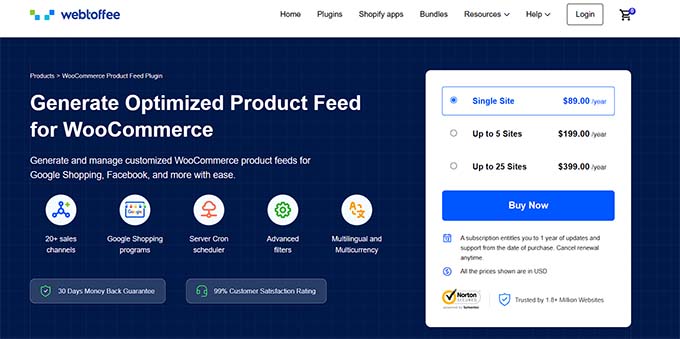
WebToffee’s Product Feed is designed to help you create optimized product feeds for social commerce platforms.
It’s an excellent choice for stores that use Instagram and Facebook as their main sales channels.
My Experience
I found the setup quick and reliable, with feeds appearing correctly formatted on both platforms.
The plugin handles Facebook Catalog and Instagram Shopping feeds very well, ensuring that your products appear correctly formatted and optimized for social media shoppers.
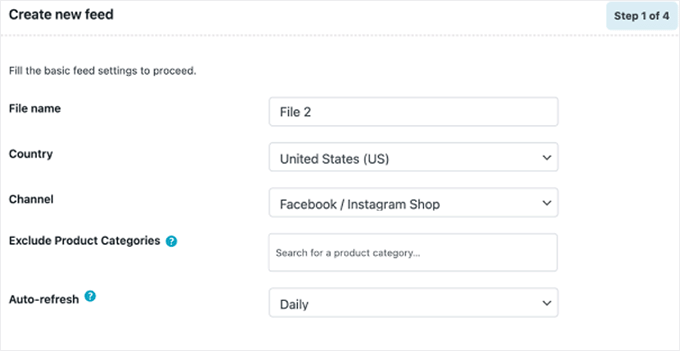
The plugin is also flexible if you need custom product feeds. During my testing, I found it useful to create tailored feeds for different purposes.
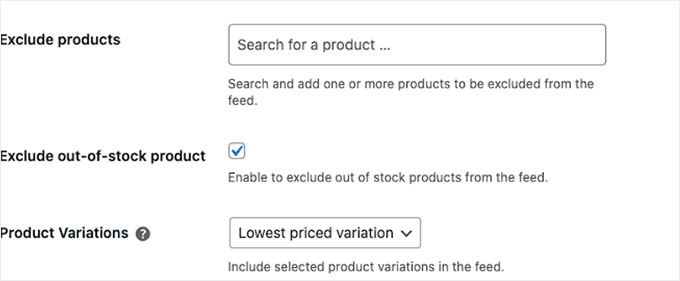
You can exclude out-of-stock products automatically, which prevents disappointed customers and maintains a professional storefront appearance across all platforms.
Another super helpful feature is the multi-vendor store support.
If you’re running an online marketplace with multiple sellers, WebToffee makes it easy to handle vendor-specific feeds. This allows different vendors to manage their product visibility across social channels without conflicts.
✅ Pros of WebToffee Product Feed for WooCommerce
- Exceptionally smooth Instagram and Facebook integration
- Support for multiple feed formats (XML, CSV, XLSX, TXT)
- Multilingual store compatibility for international selling
- Multi-vendor marketplace support
- Custom feed creation with advanced filtering options
- Regular updates to match platform requirements
❌ Cons of WebToffee Product Feed for WooCommerce
- Smaller platform selection compared to some competitors
- Advanced features are only available in the premium version
- It may not be ideal for stores focusing on marketplaces outside social media
Why I recommend WebToffee Product Feed for WooCommerce: For any store where Instagram and Facebook are key sales channels, this plugin is an excellent choice. It offers reliable social feed integration designed specifically for those platforms.
🚨 Heads Up: The next two plugins I’m about to cover have very similar names. Be sure to check the developer — Conversios (#5) and RexTheme (#6) — to tell them apart. They are both great tools, but they excel in different areas!
5. Product Feed Manager by Conversios – Automated International Product Feeds
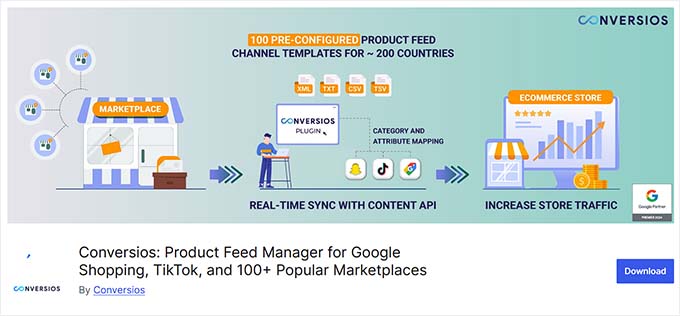
Product Feed Manager by Conversios is great for reaching international customers on platforms like TikTok and Google Shopping. It’s designed specifically for online stores trying to sell worldwide.
My Experience
During my testing, I found the plugin’s collection of over 100 ready-made templates for 200 countries to be very helpful.
This eliminates the guesswork and manual setup that usually comes with international product feed creation.
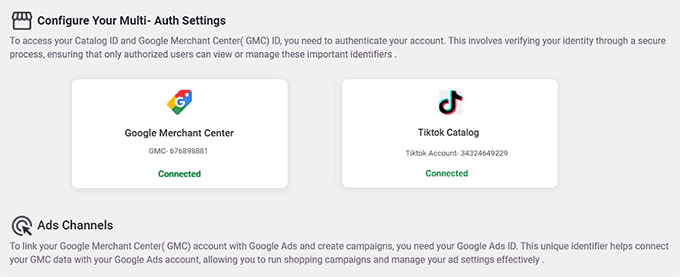
The templates are properly configured for each country’s specific requirements, making global expansion much more manageable.
I also really liked the automated product feed generation. Once it’s configured, Conversios handles feed creation and updates automatically across multiple platforms, which is perfect if you don’t have time to manually manage feeds.
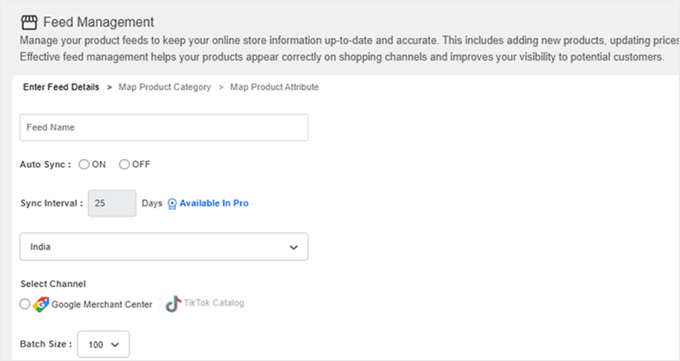
Plus, I found the custom field creation particularly valuable – the plugin generates essential fields like Brand, GTIN, Age-group, and Gender without requiring extra coding.
✅ Pros of Product Feed Manager by Conversios
- 100+ ready-made product feed templates for 200 countries
- Automated product feed generation and updates
- Creates custom fields without additional coding
- Compatible with popular WooCommerce plugins
- Multi-platform support with centralized management
- Country-specific feed optimization
❌ Cons of Product Feed Manager by Conversios
- Advanced template customization can be tricky for beginners
- Some international feed features require higher-tier plans
- Country-specific settings may need extra configuration for compliance
Why I recommend Product Feed Manager by Conversios: This is an excellent solution for stores expanding globally. Its country-specific templates for TikTok and Google Shopping can automate the complex process of creating compliant international feeds.
6. Product Feed Manager by RexTheme – Easy Setup for 180+ Marketplaces
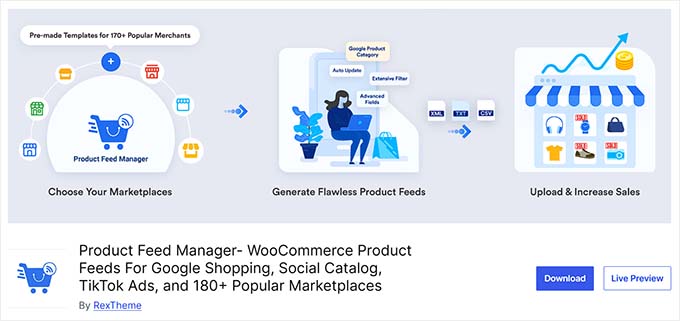
Product Feed Manager by RexTheme offers a simple and easy-to-use interface, which is great for beginners who feel overwhelmed by complex tools.
It helps you create product feeds for over 180 marketplaces and advertising platforms, including Facebook and X (Twitter).
My Experience
When I tested the plugin, I found its dashboard to be clean and intuitive. It focuses on making the feed creation process as straightforward as possible.
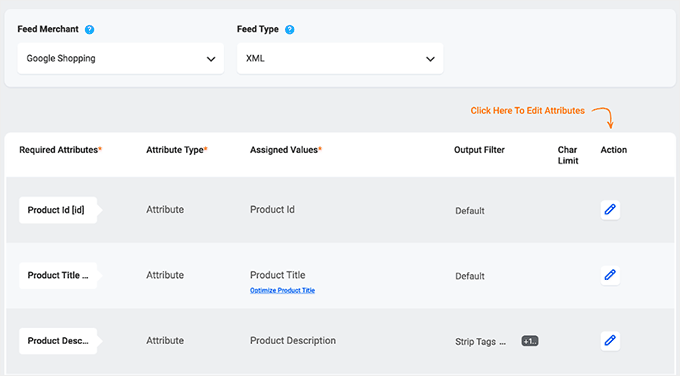
The interface is logical and well-organized, which is helpful when you are managing multiple feeds across different platforms.
The plugin is also great for creating Facebook and Twitter Ads feeds. During my testing, I found these integrations to be easy to set up and beginner-friendly.
When you’re setting up Facebook Catalog or Twitter Ads product feeds, the process is straightforward and doesn’t require deep platform knowledge.
✅ Pros of Product Feed Manager by RexTheme
- Access to 180 marketplaces and advertising platforms
- Support for major platforms like Google Shopping and Instagram
- Beginner-friendly setup process
- Comprehensive marketplace coverage, including eBay and Pinterest
- Regular platform updates and compatibility maintenance
❌ Cons of Product Feed Manager by RexTheme
- Limited customization options for power users
- Pro version required to unlock full marketplace coverage
Why I recommend Product Feed Manager by RexTheme: If you find other plugins too complicated, this is a great alternative. Its focus on a clean, simple user experience makes it an excellent choice for beginners who want an easy way to get started with product feeds.
7. Product XML Feed Manager for WooCommerce – Full Custom XML Feed Control
The Product XML Feed Manager for WooCommerce plugin gives you detailed control for creating custom XML feeds.
It’s a useful tool for developers or tech-savvy owners who need to build a feed for a niche marketplace or meet unique technical requirements that pre-built templates can’t handle.
My Experience
I went through the process of creating custom XML feeds from scratch. I noticed that this gave me full control over the feed’s structure and content, unlike plugins that rely on pre-built templates.
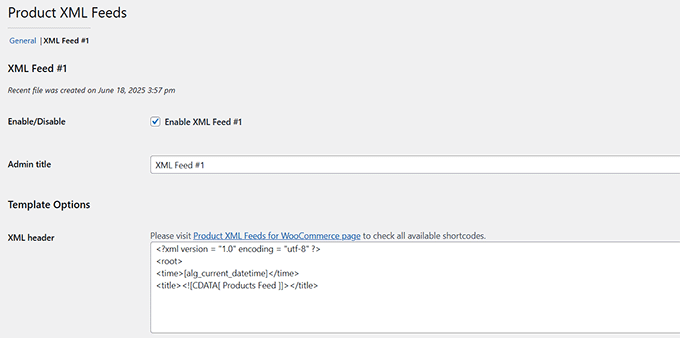
However, this plugin is aimed at users comfortable with code. To use it effectively, you’ll need a basic understanding of XML and be able to read the technical feed documentation provided by your target marketplace.
For most users, a template-based plugin like Product Feed PRO or CTX Feed is a much better starting point.
✅ Pros of Product XML Feed Manager for WooCommerce
- Custom XML feed creation with complete control over structure
- Dynamic product selection based on categories and tags
- Flexible export options for any marketplace
- Advanced filtering and product management tools
❌ Cons of Product XML Feed Manager for WooCommerce
- Requires technical knowledge to create custom XML feeds
- The free version only allows one feed, limiting use for larger stores
- Not ideal for users who need quick, template-based feeds
Why I recommend Product XML Feed Manager for WooCommerce: When pre-built templates won’t work and you need to build a product feed from the ground up, this plugin offers the flexibility you need.
Bonus: Smash Balloon Instagram Feed Pro – Shoppable Instagram Feeds on Your Site
If you want to show off your WooCommerce products directly on your website while reaching a customer base on Instagram, then Smash Balloon Instagram Feed Pro is worth a look.
This powerful social media plugin lets you set up shoppable Instagram feeds and display them on your WordPress website.
You can learn more about the plugin in our detailed Smash Balloon review.
My Experience
When I tried out Smash Balloon, what really stood out was how easy it is to turn your Instagram posts into a shoppable feed.
Unlike AdTribes or CTX Feed, this plugin doesn’t send your products to multiple marketplaces—it focuses on Instagram, letting your visitors browse and buy right from your website.

When I set it up, I loved that the live feed editor made customization simple. You can adjust the layout, colors, and even spacing between posts, and see the changes in real time.
The feed also automatically updated whenever I posted new content on Instagram, saving me a ton of time compared to manually embedding posts.
It’s perfect if your store relies heavily on visuals and social media engagement.
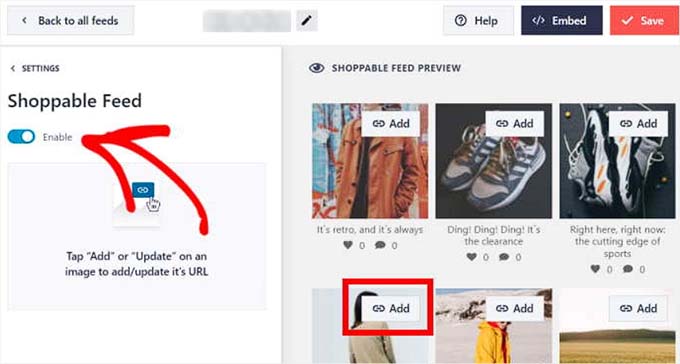
One thing to note: Smash Balloon is very focused. If you’re looking for multi-channel feeds like Google Shopping, this isn’t the plugin for that. But if your audience is active on Instagram, it’s an elegant, hands-on way to boost product visibility.
For step-by-step instructions, you can see our tutorial on how to sell your WooCommerce products on Instagram.
✅ Pros of Smash Balloon Instagram Feed Pro
- Turns Instagram posts into shoppable feeds on your WooCommerce site
- Live feed editor makes customizing layout and colors easy
- Automatically updates when you post new Instagram content
- Seamless connection between Instagram and WooCommerce
❌ Cons of Smash Balloon Instagram Feed Pro
- Only works for Instagram feeds
- Premium version needed for shoppable posts
- Focused on website display, not multi-platform selling
Why I recommend Smash Balloon Instagram Feed Pro: This is the ideal plugin if Instagram is a key marketing channel for your store. It’s hands-on, flexible, and gives you a beautiful way to showcase products directly on your website.
What Is the Best WooCommerce Product Feed Plugin?
Product Feed PRO by AdTribes is my top recommendation. It offers a great balance between powerful multi-channel features and flexibility, making it ideal for store owners who want full control and reliable feeds for 100+ platforms.
Alternatively, CTX Feed is a strong choice for beginners who want multi-channel support with a guided, template-driven setup. Its user-friendly interface and pre-configured templates make it easy to start listing products across multiple platforms quickly.
For stores focused on social commerce, the WebToffee Product Feed for WooCommerce plugin is a great option. It provides a simple and reliable integration experience for Instagram and Facebook.
Frequently Asked Questions About WooCommerce Product Feed Plugins
Here are some questions frequently asked by our readers about WooCommerce product feed plugins:
Do I need technical knowledge to set up product feeds?
Most modern product feed plugins are designed for non-technical users. Plugins like CTX Feed, Product Feed PRO by AdTribes, and Product Feed Manager offer user-friendly interfaces with pre-configured templates that require minimal technical knowledge.
However, if you need highly customized feeds or specific XML formatting, some technical understanding will be helpful. For basic Google Shopping, Facebook, or Instagram feeds, the setup process is typically straightforward.
How do I optimize a product feed?
To optimize a product feed, make sure your product titles, descriptions, and images are clear and match the platform’s requirements.
Include accurate prices, categories, and stock information. Use keywords for better search visibility, and regularly update your feed to keep it in sync with your store.
How can I create a product bundle in WooCommerce?
You can easily create and sell product bundles with YITH WooCommerce Product Bundles. It lets you add individual products, set discounts, and publish your bundle.
To get started, take a look at our tutorial on how to sell product bundles in WooCommerce.
Will my product feed work with variable products?
Most modern plugins support variations and bundles. Be sure to check how your chosen plugin maps variations to the feed, especially for platforms like Google Shopping, which require specific rules.
How do I export product data from WooCommerce?
You can export product data using WooCommerce’s built-in export tool or a plugin like Product Import Export for WooCommerce. Simply select the products you want, generate a CSV, and download it.
For more information, you can check our tutorial on importing and exporting WooCommerce products.
Which plugin is best for selling on Instagram?
Smash Balloon Instagram Feed Pro is ideal for Instagram-focused selling, letting you create shoppable feeds directly on your website without pushing products to multiple marketplaces.
Additional Resources for Your WooCommerce Store
Once your product feeds are set up, here are some other helpful guides to grow and optimize your WooCommerce store:
- How to Speed Up Your eCommerce Website (Proven Tips)
- How to Add Wholesale Pricing in WooCommerce (Step by Step)
- Profitable Ecommerce Business Ideas for WordPress (Expert Pick)
- Ecommerce Security Tips: How to Secure Your WordPress Store
- How to Upsell Products in WooCommerce (Easy Ways)
- Best WooCommerce Reporting and Analytics Plugins
- How to Setup WordPress Email Logs (and WooCommerce Email Logs)
- How to Optimize the Customer Journey for WooCommerce Store
- Best WooCommerce Automations to Increase Sales
If you liked this article, then please subscribe to our YouTube Channel for WordPress video tutorials. You can also find us on Twitter and Facebook.
The post 7 Best WooCommerce Product Feed Plugins Ranked (My Experience) first appeared on WPBeginner.