



WordPress 6.9 is finally here 🥳, and it marks the final major release of 2025. After months of following the development, we are excited to see this update go live.
This release focuses heavily on improving your workflow. You’ll find new ways to collaborate with your team, cleaner ways to draft content, and native blocks that replace the need for extra plugins.
We’ve explored all the new features, and in this guide, we’ll walk you through what’s new in WordPress 6.9 with screenshots and tips on how to use them.
ℹ️ Important: Don’t forget to create a complete WordPress backup before updating to 6.9. If you use managed WordPress hosting, your host may update it for you automatically.
Here is a quick overview of the changes in WordPress 6.9:
- Collaborate with Block-Level “Notes” 💬
- Hide Blocks on the Front End (Block Visibility)
- A Smoother Drag and Drop Experience
- New Blocks to Better Organize Content
- Improved Email Handling and Inline Images
- Command Palette Available Everywhere ⌨️
- AI Developments in WordPress 6.9
- Performance and Speed Upgrades 🚀
- Other Developer Changes:
Collaborate with Block-Level “Notes” 💬
WordPress 6.9 is taking a big step toward better team collaboration. The new “Notes” feature lets you attach comments directly to individual blocks, just like in Google Docs.
Previously, you had to use Slack or third-party plugins to discuss edits. Now, you can simply click the three-dot menu on any block and select ‘Add note’ to leave feedback.

Your team members can reply to notes, tag others, and resolve the thread once the changes are made.
You can also view a list of all notes on a page by clicking the Notes button in the top toolbar.
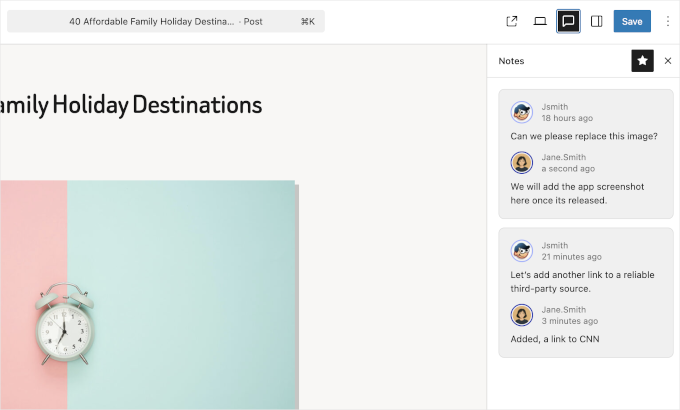
This is a huge improvement for editorial workflows. Best of all, these notes are private to the editor and will never be seen by your website visitors.
Hide Blocks on the Front End (Block Visibility)
Have you ever wanted to draft a section of a page but not show it to the public yet? In the past, you needed a plugin for this.
WordPress 6.9 adds a native Hide on Frontend option. This lets you keep blocks in your editor while making them invisible to visitors.
To use it, just click the three-dot menu on a block and select ‘Hide’.
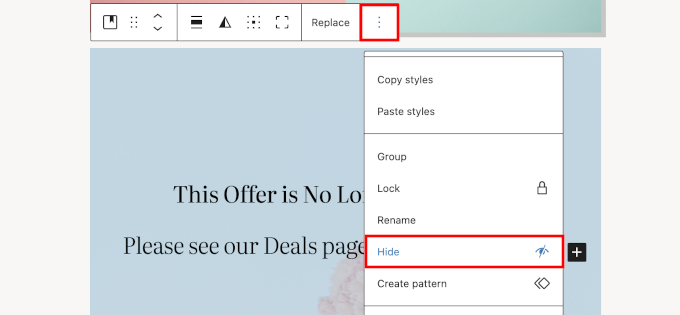
The block will vanish from the visual canvas, but you can still find it using the Document Overview (List View).
From there, you can toggle visibility back on whenever you are ready to publish.
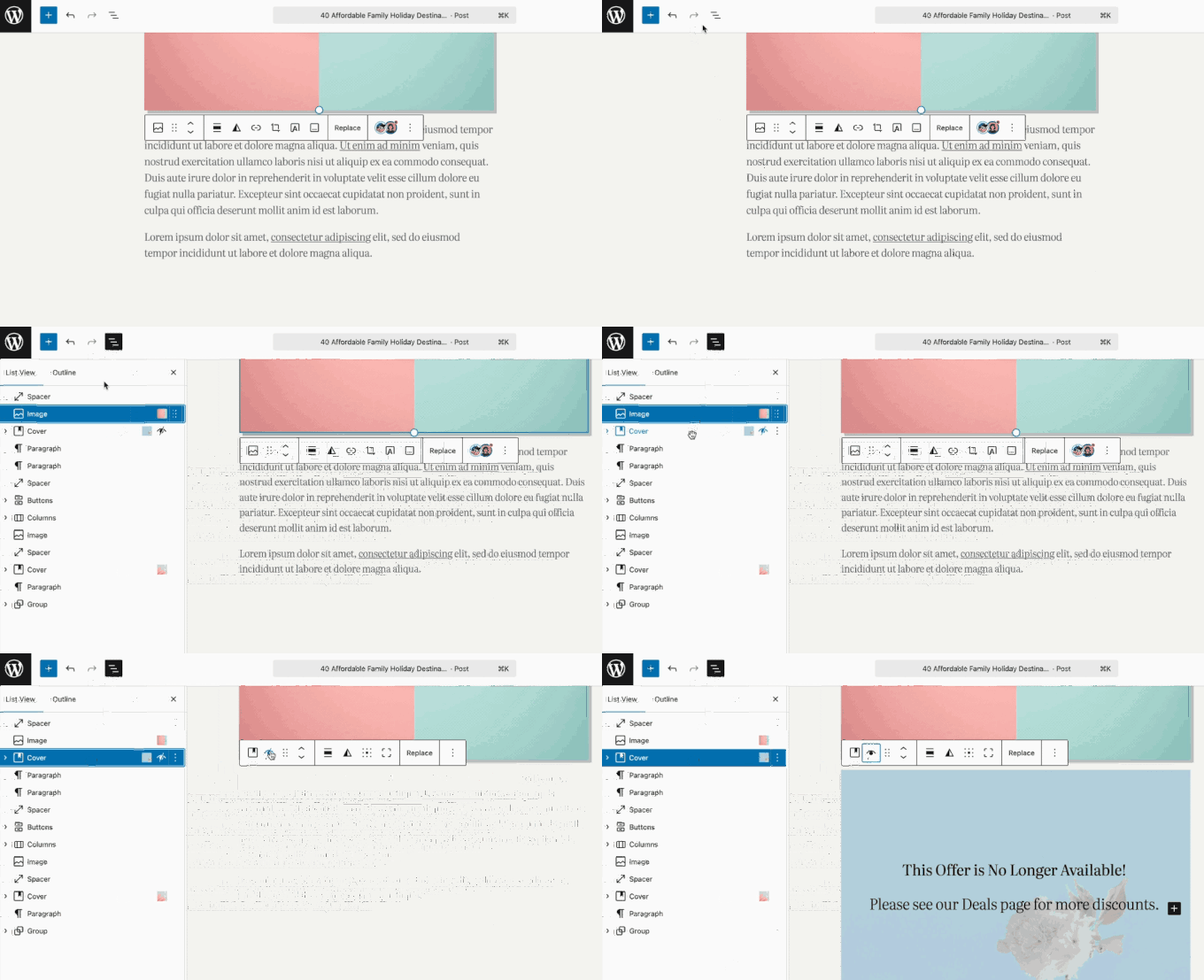
This is perfect for preparing seasonal content (like Black Friday banners) in advance or drafting updates without creating a whole new page.
A Smoother Drag and Drop Experience
For many beginners, moving blocks around the editor used to feel a bit clunky. You had to grab a specific “handle” to move things.
WordPress 6.9 introduces Direct Drag and Drop. You can now click and drag blocks more intuitively within the editor without needing to find the small drag handle.
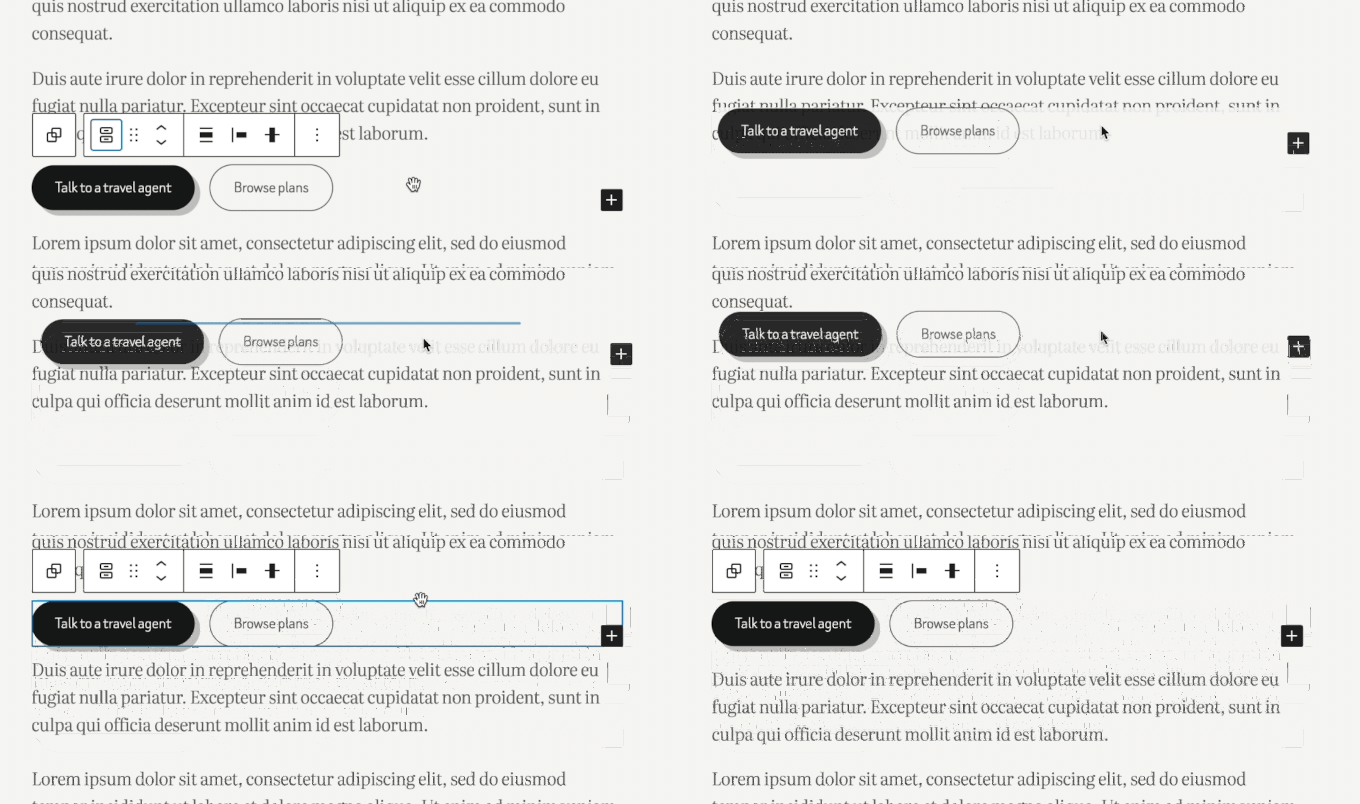
This makes the Block Editor feel much more like a true visual page builder, significantly speeding up your design process.
New Blocks to Better Organize Content
This release eliminates the need for several common plugins by adding new, powerful blocks to the core library.
1. The Accordion Block
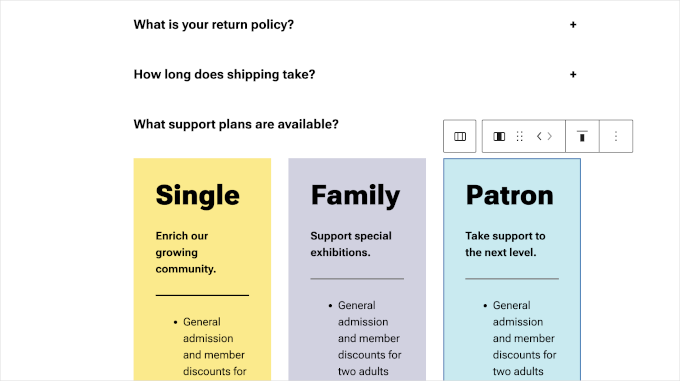
You can finally create collapsible content sections natively. The new Accordion block allows you to add multiple text panels that expand and collapse.
Pro Tip: The Accordion block supports Anchors. This means you can create direct links to specific questions inside your FAQ section, which is great for SEO and the user experience.
2. Terms Query Block
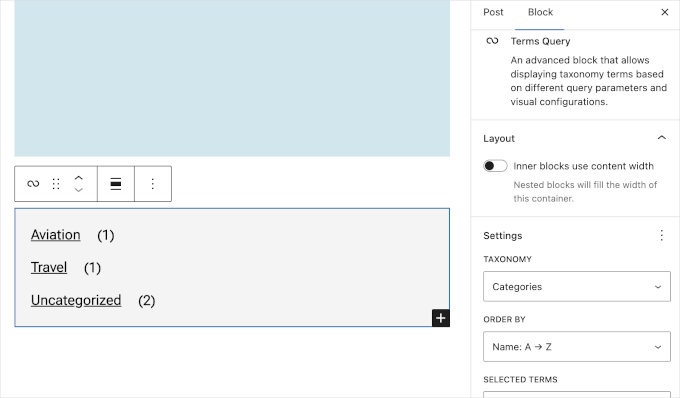
This block lets you display a dynamic list of categories or tags anywhere on your site.
It is highly customizable and updates automatically as you add new content.
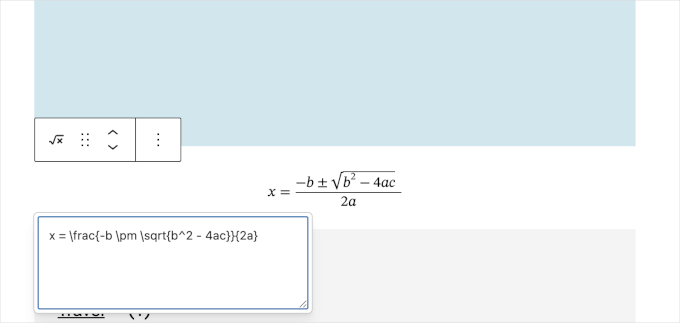
3. Math Block
Do you run an educational site? You no longer need an extra plugin to write math equations.
The new Math block supports LaTeX and MathML standards out of the box.
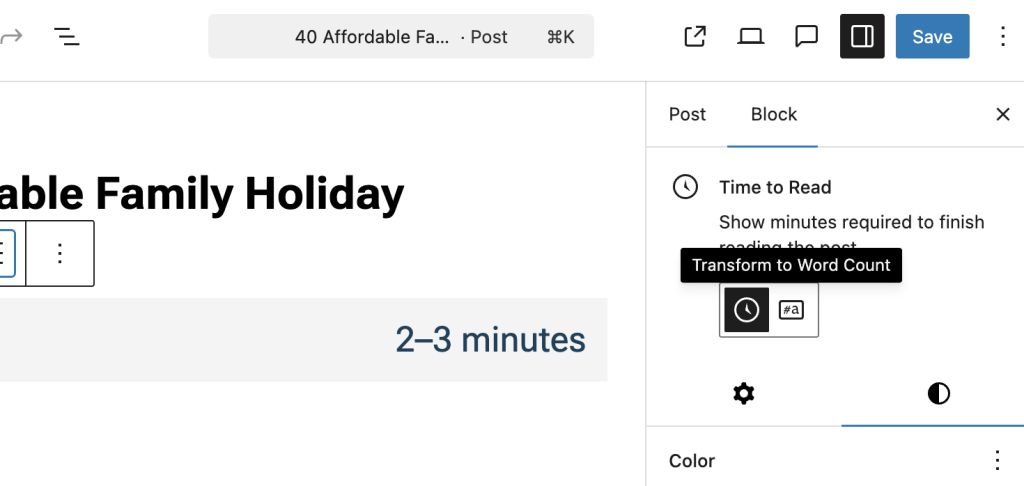
4. Time to Read Block
This small but useful block calculates and displays the estimated reading time of your post.
Adding this to the top of your articles can encourage visitors to start reading.
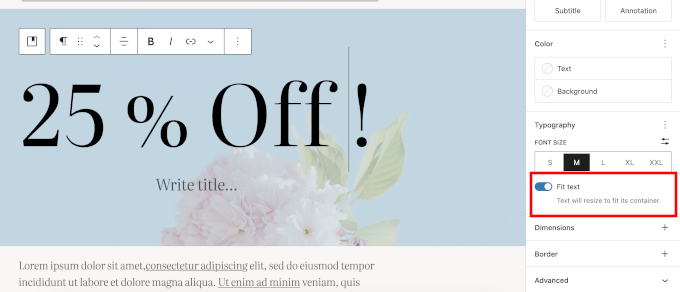
5. Better Typography with “Fit Text”
A new “Fit text” option is available for paragraphs and headings. It automatically scales your text to fill the container size.
This is fantastic for creating bold, responsive hero sections that look good on all screen sizes.
Improved Email Handling and Inline Images
This is a “behind-the-scenes” update that will help WordPress developers and users who want to customize WordPress emails. WordPress 6.9 has improved the way it sends emails (via the wp_mail function).
The system now supports inline images. This means that emails sent by WordPress—like password resets, new user notifications, or receipts—can now include images directly in the message body.
This improves usability and ensures your emails look professional, rather than showing broken image icons in your subscribers’ inboxes.
Note: This update doesn’t solve the email deliverability issues. For that, we recommend using WP Mail SMTP, which allows you to use the secure SMTP protocol to send WordPress emails.
Command Palette Available Everywhere ⌨️
The Command Palette is a power-user tool that lets you quickly jump to different parts of your site by pressing Ctrl + K (or Command + K on Mac).
In WordPress 6.9, this feature is now available across the entire WordPress dashboard, not just the Site Editor.
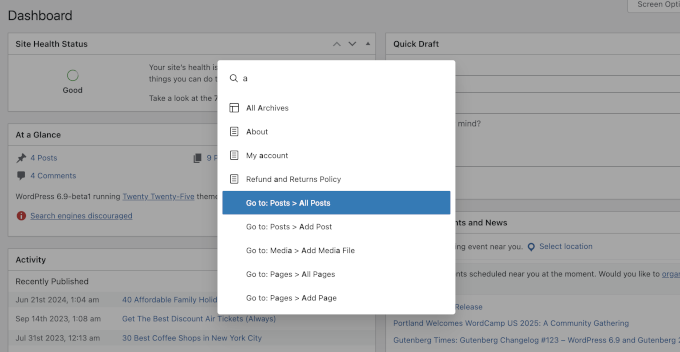
You can use it to instantly search for a specific setting, jump to the Plugins page, or create a new post without clicking through multiple menus.
AI Developments in WordPress 6.9
WordPress 6.9 brings significant AI updates. Here is a summary of those updates:
1. Abilities API
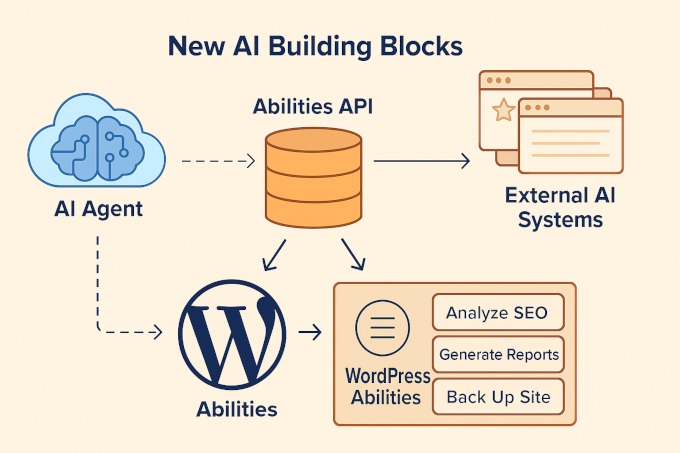
The all-new Abilities API is a registry of everything WordPress can do in a machine-readable format.
For years, WordPress has offered thousands of functions through core software, plugins, and themes — but these were only accessible through code.
The Abilities API provides a shared language that both humans and AI platforms can understand.
Each plugin or theme can “register” what it’s capable of — for example, analyze SEO content, generate reports, or back up your site — along with clear inputs, outputs, and permissions.
2. MCP Adapter
Think of the MCP Adapter as a bridge. It connects the WordPress Abilities API with the MCP specification, giving AI agents a standardized way to “talk” to your website.
This tool includes support for standard connections (like HTTP and STDIO) and comes with built-in error handling. This makes it much easier for developers to build custom AI integrations that are both flexible and reliable.
3. PHP AI Client
The new PHP AI Client makes it much easier for developers to add AI features to their plugins.
It works with all major AI providers, giving developers the freedom to choose the exact model they need. Best of all, it manages your credentials centrally, so you don’t have to enter your API keys separately for every plugin.
Performance and Speed Upgrades 🚀
As with every major release, WordPress 6.9 is faster. The core team has made several changes to improve page load times for visitors:
- Smarter Style Loading: For “Classic Themes,” WordPress now only loads the CSS for the blocks you are actually using on the page, rather than loading everything at once. [#64099]
- Less Render Blocking: Scripts for things like emojis have been moved to the footer, which helps the visible part of your website appear faster (improving your LCP score). [#64076]
- Optimized Background Tasks: Scheduled tasks (Cron jobs) now run at shutdown, so they don’t slow down the page load for your visitors. (#63858)
Other Developer Changes:
- Block Bindings API UI: The interface for connecting block attributes to custom fields has been improved, allowing you to bind or unbind data with a single click.
- PHP 8.5 Support: WordPress 6.9 adds beta support for PHP 8.5, ensuring compatibility with the latest server environments.
We hope this article helped you discover what’s new in WordPress 6.9. We are particularly excited about the Notes feature for collaboration and the improvements to email reliability.
If you liked this article, then please subscribe to our YouTube Channel for WordPress video tutorials. You can also find us on Twitter and Facebook.
The post What’s New in WordPress 6.9? (Features & Screenshots) first appeared on WPBeginner.